GPU simulator · runs on the CPU · open source
Test CUDA software on a rack of GPUs you don’t have.
PantheonSim simulates NVIDIA GPUs on an ordinary CPU — the driver,
the CUDA runtime and its libraries, nvidia-smi and NVML — so
unmodified programs compile, run, and fail exactly where they would on a card.
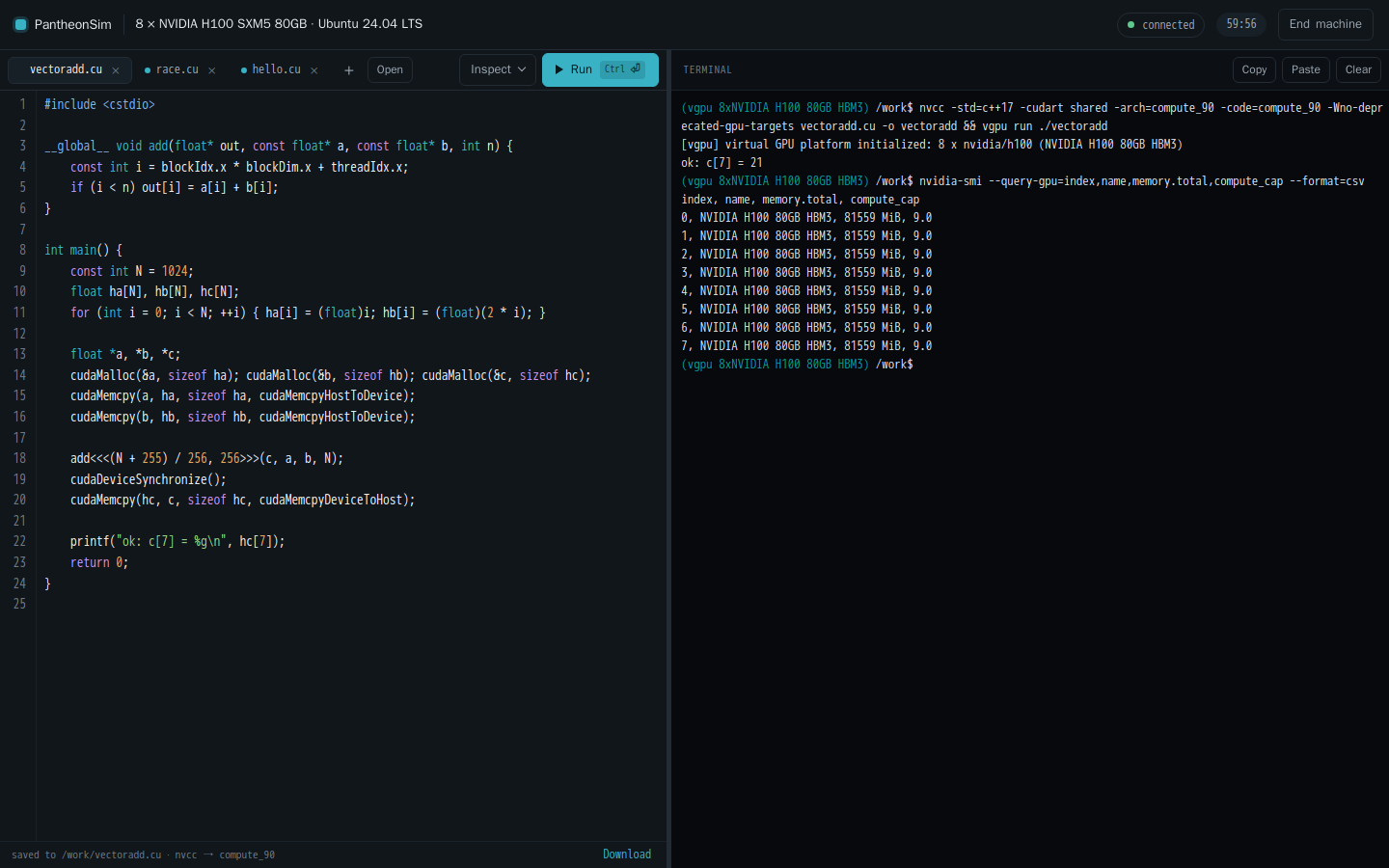
No GPU, no sign-up. The playground gives you a Linux machine with the cards you pick, a CUDA compiler and a terminal, in the browser.
(vgpu 8xNVIDIA H100 80GB HBM3) ~$ nvidia-smi
+-----------------------------------------------------------------------------------------+
| NVIDIA-SMI 560.35.05              Driver Version: 560.35.05      CUDA Version: 12.6     |
+-----------------------------------------+------------------------+----------------------+
| GPU  Name                 Persistence-M | Bus-Id          Disp.A | Volatile Uncorr. ECC |
| Fan  Temp   Perf          Pwr:Usage/Cap |           Memory-Usage | GPU-Util  Compute M. |
|                                         |                        |               MIG M. |
|=========================================+========================+======================|
|   0  NVIDIA H100 80GB HBM3          On  |   00000000:01:00.0 Off |                  N/A |
|  0%   32C    P8             56W /  700W |       0MiB /  81559MiB |      0%      Default |
|                                         |                        |                  N/A |
+-----------------------------------------+------------------------+----------------------+
|   ...                                                                                   |
+-----------------------------------------+------------------------+----------------------+
|   7  NVIDIA H100 80GB HBM3          On  |   00000000:08:00.0 Off |                  N/A |
|  0%   32C    P8             56W /  700W |       0MiB /  81559MiB |      0%      Default |
|                                         |                        |                  N/A |
+-----------------------------------------+------------------------+----------------------+
Your program doesn’t know the difference
Build with the real CUDA toolkit, run the binary unchanged. The simulator answers every call a program makes, under the same library names a GPU driver installs.
Unmodified CUDA programs
nvcc-compiled binaries from CUDA 12 and 13 run as they are, with their kernels interpreted on the CPU.
nvcc -cudart shared app.cu -o app
vgpu run --gpu nvidia/h200 ./app
The libraries programs link
cuBLAS, cuBLASLt, cuDNN, cuFFT, cuRAND, cuSPARSE, cuSOLVER, NCCL, NVRTC, NPP and nvJPEG — each tested against NVIDIA’s own library on a physical GPU.
The tools people run
nvidia-smi, NVML, pynvml, gpustat,
nvitop and lspci report the machine you asked for. Numba
and Triton JIT kernels run too.
Cards measured, not guessed
11 GPU profiles were read off physical cards and checked against them, from Turing to Grace Hopper. The rest say they are not.
What a real GPU won’t tell you
A simulator sees every lane of every warp. These come straight from it.
Find the race
Two warps wrote the same word with no barrier. Hardware usually hides it; this names the kernel, the PTX line and the instruction.
$ VGPU_SCHEDULER=adversarial vgpu run --race ./race
[vgpu] data race: read-write race on shared memory at byte offset 0: warp 2 and warp 0 both reach it with no bar.sync between them
  in kernel '_Z5tallyPi', PTX line 38
  instruction: st.shared.u32[_ZZ5tallyPiE5local], %r4
  GPU profile: nvidia/h100
Run on every card at once
The same binary on each profile, outputs compared. A result that depends on the card shows up here, not in production.
$ vgpu test --matrix ./vectoradd
profile                    exit  output
nvidia/a10                    0  baseline
nvidia/a100                   0  identical
nvidia/h100                   0  identical
nvidia/rtx3060                0  identical
nvidia/a100-sxm4-40gb         0  identical
...
11 profiles: 10 identical to nvidia/a10, 0 different
Count, don’t sample
Exact instruction, memory and sector counts for every launch. They do not move between runs.
$ VGPU_COUNTERS=1 vgpu run ./vectoradd
[vgpu][counters] _Z3addPfPKfS1_i  grid=4x1x1 block=256x1x1
    inst_executed=704  thread_inst_executed=22528  lanes_active_avg=32.00/32
    global  ld=2048 st=1024  read=8192 B write=4096 B
    shared  bank_conflicts=0 over 0 requests
    mix     fp16=0 fp32=1024 fp64=0 int=5120 cvt=3072
Honest about what it is
- It does not predict performance. There is no timing, cache or thermal model — timings mean nothing here, and counters mean everything.
- It does not replace hardware. Run it on every commit; keep a nightly run on physical GPUs before a release.
- Gaps fail loudly. Anything not implemented stops with the instruction, the PTX line, the kernel and the profile — never a quiet wrong answer.
every commit         PantheonSim, on CPU runners
nightly / release    physical GPUs
Try it without installing anything
Pick up to eight cards and an operating system and you get a Linux machine with
nvcc, an editor and a terminal. Compile a kernel, run it, point the race
detector at it. Sessions last an hour and the network reaches GitHub, PyPI and
Hugging Face.
GPUs
Every profile the simulator carries. “Measured” means its values were read off a physical card and diffed against it.
| Card | Architecture | Memory | Compute | Profile |
|---|---|---|---|---|
| NVIDIA H100 SXM5 80GB | Hopper | 80 GB | 9.0 | measured |
| NVIDIA H100 PCIe 80GB | Hopper | 80 GB | 9.0 | measured |
| NVIDIA A100 80GB | Ampere | 80 GB | 8.0 | measured |
| NVIDIA A100 SXM4 40GB | Ampere | 40 GB | 8.0 | measured |
| NVIDIA A10 | Ampere | 24 GB | 8.6 | measured |
| NVIDIA A10G | Ampere | 24 GB | 8.6 | measured |
| NVIDIA L4 | Ada Lovelace | 24 GB | 8.9 | measured |
| NVIDIA L40S | Ada Lovelace | 48 GB | 8.9 | measured |
| NVIDIA Tesla T4 | Turing | 16 GB | 7.5 | measured |
| NVIDIA RTX 3060 | Ampere | 12 GB | 8.6 | measured |
| NVIDIA GH200 480GB | Hopper/Grace | 96 GB | 9.0 | measured |
| NVIDIA H200 | Hopper | 141 GB | 9.0 | not yet measured |
| NVIDIA B200 | Blackwell | 192 GB | 10.0 | not yet measured |
Run it on your own machine
Linux, CMake 3.20 or newer and a C++20 compiler. No GPU, no CUDA toolkit and no third-party libraries are needed to build it; the toolkit is only needed to compile your own CUDA programs.
$ git clone https://github.com/pantheongpu/pantheonsim
$ cd pantheonsim && ./scripts/build.sh
$ ./build/vgpu shell --gpu nvidia/h100 --count 8